What AI agents are actually good at in a small business (and where they fall short)
Everyone's being asked for an AI plan. Here's a practical look at where AI agents save real time, where they don't, and how to pick a first project that pays off.
If you run a business right now, someone has probably asked you, “What’s our AI plan?” The demos look like magic. The reality is more mixed: some uses of AI save a team hours every week, and others create more work than they remove.
We use AI tools like Claude and Gemini every day, in our own work and in the software we build for clients. Here’s our practical view of what AI agents are good at, where they fall short, and how to choose a first project that actually pays off.
What an AI agent is
A chatbot answers one question at a time. An AI agent works through a task with several steps. It reads the information in front of it, decides what to do next, uses tools like a search, a spreadsheet, your CRM or an email draft, and checks the result before moving on.
That makes agents good at the in-between work that fills a lot of days: the reading, sorting, looking up and drafting that sits between your systems and your decisions.
Where AI agents earn their keep
1. Turning messy information into clean data
Emails, PDFs, web forms, scanned documents and meeting notes all hold information your business needs in a structured form: a customer’s name, an order number, a delivery date, a request type. Pulling that out by hand is slow and error-prone. Agents are very good at reading unstructured text and filling in the right fields in your system.
2. First drafts of routine writing
Follow-up emails, proposal summaries, meeting recaps, product descriptions, social posts: much of a team’s writing follows a pattern. An agent can produce a solid first draft in your tone from the details at hand, and a person reviews and sends it. The time saved adds up quickly, and the human check keeps quality where it should be.
3. Research and triage
Gathering background on a prospect, checking a website, comparing options, or sorting a stack of incoming requests by urgency are tasks where an agent can do the legwork and hand a person a short, organized summary to act on.
4. Answering questions from your own documents
Every business has knowledge buried in policies, past proposals, manuals and old email threads. An assistant built with retrieval-augmented generation (RAG) searches your own documents and answers from them, not from the open internet. New staff get answers in seconds, and the questions stop landing on the one person who “just knows.”
5. The glue between your systems
Combined with integrations, agents can move information where it needs to go: update a record when an email arrives, create a task when a form comes in, flag an order that looks wrong. This is where AI and ordinary automation work best together.
Where they fall short
- They aren’t right every time. AI models can be confidently wrong. For anything where a mistake is costly, like pricing, legal wording, payments or medical information, keep a person approving the output.
- Vague jobs get vague results. “Grow the business” isn’t a task an agent can do. “Draft a follow-up for every lead who hasn’t replied in five days” is.
- They can’t fix a broken process. Automating a messy workflow just produces mess faster. Sort out the process first, then automate it.
- Your data has to be handled properly. Pasting customer information into a free chatbot is a risk. Business use calls for accounts and settings that keep your data private and out of model training.
A quick test for a good first project
A task is usually a strong candidate for an AI agent if:
- it happens often, daily or weekly, not once a quarter
- the inputs and the expected result are clear
- mistakes are cheap, or easy to catch before they matter
- the information it needs is available, in your systems or documents
- someone on your team owns the result and can check it
If a task meets most of these, it’s worth trying. If it meets one or two, it’s probably better left to people for now.
How we approach AI projects
- Start with one workflow. We pick the task where your team loses the most time and measure whether AI actually saves it.
- Choose the model for the job. Different models suit different tasks. We work with both Claude and Gemini rather than forcing one tool onto every problem.
- Ground it in your information. For anything that needs to know your business, we use RAG so answers come from your documents and data.
- Keep your data private. We set up enterprise-level accounts configured so your information isn’t used to train models.
- Keep a person in the loop wherever a mistake would be costly.
An example: a command center for a subscription web business
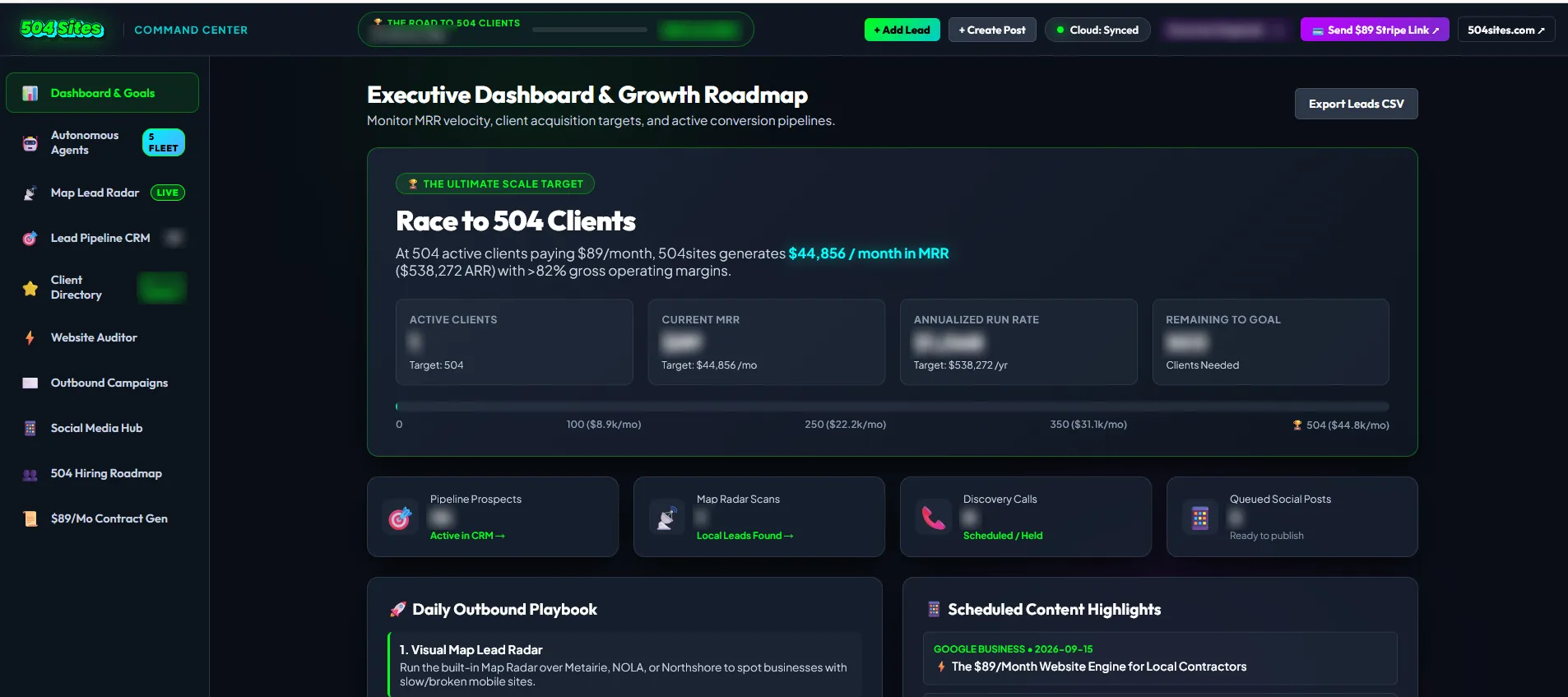
504 Sites builds and hosts websites for small businesses on a monthly plan, so growth depends on a steady flow of leads and consistent follow-up. We built the 504 Sites Command Center to run that whole process from one place: finding prospects with Google Maps business data, auditing their current websites, tracking the pipeline, planning outreach and scheduling social posts. A fleet of AI agents built on Google’s Gemini handles repetitive growth work in the background, so a small team can follow a repeatable daily playbook. (Read the case study.)
Wondering where AI fits in your business? Tell us where your team’s time goes, and we’ll give you an honest answer on what’s worth automating, and what isn’t. You can also read more about our AI agents and automation work.